SALTT Solns.

Author: admin

  • TOTAL RECALL!

    TOTAL RECALL!

    I did consider using the trope of Total Recall in a pitch deck (a presentation to raise finance for this SALTT project) but owing to time limits, it didnt make the cut. Total Recall is an old school Arnie film Based on the 1966 short story “We Can Remember It for You Wholesale” by Philip K. Dick. Arnie plays a builder who goes to the Rekall agency for some entertainment and low and behold, he turns out to be some Martian secret agent who has had his memories blanked – or is he? The film would screw with your mind if it wasnt such a cheesy 80s SciFi flick.

    I used the metaphor for when I started to realise what SALTT was actually about. SALTT came as an attempt to shift my life from empty, soul draining tedium to finding things that gave me a personal sense of accomplishment – to get my life in order a bit. It was when I considered that there might be others like me that might benefit from what I was doing ,that I had a bit of a wake up call.

    My life-long aspiration was to be a tech founder. Since my friend’s mother, a matths teacher at the first school in my homewown to get a computer, brought a Commadore PET home at weekends for us to mess with – I wanted to to tech.

    I kept trying but circumstances burried that aspiration in a dark pit of dispear. To be honest, just wanted to pass out and never regain consiousness – hardly self-actualising. Yet, as I started to revive, it clicked. Maybe I could help myself and help others also through the medium of digital technology. I remembered who I was; I was a computer geek and an entrepreneaur – it was then that I went into Total Recall. A roller-coaster ride for sure, but just over a year later, from utter apathy, I’m restless, wanting to bring SALTT to market – something has clearly changed in me – what?

    More to the point, what am I trying to say in this blog post that might provide some hope to those who have found themselves in somewhat of a mess. I guess I’m trying to say, even if it sounds Disney sickenting, ‘remember who you truly are’. No, let us dive futher

    I hit upon writing this post because I have just been thunderstruck again by the principle of Total Recall.

  • Going bionic

    Going bionic

    The Six Million Dollar Man was a 1970’s TV series where a crashed test pilot was fitted with bionic parts which made him “better, faster, stronger than he was before”. When he used his bionic legs, things went into slow motion – along with the bionic theme. As a kid at the time we used to play at going bionic.

    I got to a situation over the weekend where I was mumbling to myself over what to do next on SALTT. Not so much being stuck for choice, but rather stuck for too many choices: should I debug, work on the financials, make the instructions on how to use SALTT clearer?

    Having just reviewed Brian Tracy’s ‘Eat That Frog’ a paraphrase of his words rung in my ears:

    What one skill, if I developed and did it in an excellent fashion, would have the greatest positive impact on my career?’

    My way of thinking about this was what is the one thing I should concentrate on next that will propel SALTT the fastest and the furthest? In other words, how can I go bionic?

    The actual details don’t matter for this blog (it was about ringfencing some funding), but it became apparent that my priority course of action was to consult with an accountant (I’ve just set up the appointment).

    In terms of using SALTT, the “Accountant” topic had already been entered and was of a “Can Wait” status. I have made the topic icon much bigger and set the schedule for the appointment for tomorrow. Furthermore, I’ve empashised that I should sort out my spreadsheets today, so that I can ask the right questions.

    The order of the next things to do after that depends on the accountant’s recommendations. But I have indicated, through resizing the topic icons, the contingencies that will provide the best propulsion. I am racing to get the MVP out to expert usability testers and need to write the guide, but I also assume that quite a bit of financial jiggery-pokery might be needed. Adjusting the sizes of the topic icons is giving me a clear roadmap of where this is leading.

    However phrased, it is valuable to ask: how can I go bionic today?

  • Block Schedules

    I’ve been using this block scheduling of 28 day, instead of calander months, for many years now. It suits me and others are welcome to try it. As SALTT was by me; for me, then using Lunar month blocks has leaked into my usage of SALTT, and at some point will be fully implemented as an optional feature.

    Blocks of time for blocks of project tasks

    This strategy applies a closed list to actions. That is, actions arising in the current period are put onto a list to be done in the next period – then closed off when the next period arises. This means that no further tasks can be added to that list, but all items to be done are to be done. Instead, items arising in the subsequent period are added to a new list. This is one of the principles in Mark Forster’s “Do It Tomorrow” system, but over a longer period.

    Lunar blocks and closed lists have been useful to me in assiging future tasks for a proposed stage on a development (this is my situation at the time of writing in coding the MVP for SALTT).

    Consider a situation where you are working through a series of versions and you are currently on V0.2.0. You have a set of things you want to do in the next iteration V0.2.1, but will not commence any of them until you have finished the present work. You have scheduled your time as 28 day blocks with the next being 2026-01-28 To 2026-01-24 during which you intend to do the tasks involved in V0.2.1.

    Here is how to map that out using SALTT:

    Edit the subtree

    Move subtrees around to create some space; add a child node V0.2.1 to V0.2 node; add the tasks to be done in the next block to node V0.2.1.

    Set the schedules and statuses

    Set the Status of the V0.2.1 node to “No Need To Set”

    For all the new tasks to be done in the next block set their DSX and DFX to the future block of time (ie 2026-01-28 To 2026-01-24). DSA and DFA should be unset. All those tasks should now have a green clock status icon as they are scheduled to commence at a future time.

    When the time comes

    The status icons will change according to the date of vieweing, as will the relevant halos of the search results. When searching on Today on the 28th of January, the search halos will become Yellow Clocks indicating that those items are scheduled for commencement: ie today is withing their schedule window.

    It is a good idea to limit the number of works in progress. So when ready select and change the one you want to work on to WIP. This sets the DSA and changes the Today results halo to a Yellow WIP.

    The other items will still be Yellow Clocks – which could cause distraction. To focus, then their DSXs can be rescheduled. The quick way to do this is to chose the DIT, or Monday buttons. Their status icons will reset to Green Clocks and again turn to Yellow Clocks when the time arrives.

  • SALTT Today

    SALTT Today

    SALTT is intended as a generic canvas for organising thoughts, ideas, and other aspects of life. Of course, I did have some intention to how I was going to use it while I was developing it, but I have let my actual use of SALTT evolve through use and experimentation. This is an ongoing process and so it is worthy of exploring in this blog.

    Although the package is still in development, this is how I am finding that I am now using SALTT on a daily basis.

    I tend to leave the graph running on my deskstop screen. I have blocked my day’s activity and two of the main blocks are in the morning, when I do my “World Class Work” and in the afternoon, when I do my “Lower Value Work” (see 5ac Review).

    When I kick off in the morning, I first do a serach on “Urgent” as these are the items that are pressing and would be wise to do today.

    I then search on “Today” which shows me what is overdue (in red), and what I have scheduled for today (in yellow); the things to commence and the things I have as works in progress.

    Now, things can pile up, and there might be lots of stuff in yellow clammoring for my attention which I cannot possibly hope to get through in one day. So, I have to decide those items that I intend to do today, those that have some priority, and those that I can put off for another day.

    The best practice would be to assign a specific date to those I can delay – then do them on their assigned date. But that takes mental effort. I take the lazy approach of simply resetting them using the “Do It Tomorrow” or “Monday” buttons. This is not ideal as, like a to-do list, item can roll over endlessly – so a feature will be needed to manage what to do about this accumulation problem.

    I tend to work through the items I’ve scheduled. Sometimes they are complete or abandoned. More often, they are parts of longer projects and when I get bored, or can’t be bothered, I hit the “DIT” button. OK, it may be noble to plough through all the chosen items: I’m not that noble, but this way, at least this satisfies my awareness of where I am with things and what I am wanting to achieve.

    Sometimes I add new items as they occur to me; sometimes I just add them at the end of the day. Because the screen is in front of me, I tend to review things on a regular basis, and do a review at close of play. This is a good time to look at the “Tomorrow” search to give me the impression of what I am going to be up to the following day.

    The other search buttons: “Review”, “Unset” and “Done”, I don’t tend to look at as frequently, although it is worthwhile addressing all the unset items as soon as convenient. The “Review” search (at time of writing) is mainly for those items that “Can Wait” to be done in their own good time. A good point for reviewing is when I start running out of items to do today – though this is also a recipe for not getting around to doing things. Again, I have to decide whether those things are worth getting around to doing. The “Done” search is there to give me a sence of achievement.

    Its Friday, so now I’m going to click the “Monday” button on my “Blog” node and see how things look then.

  • The GROOVE Family

    SALTT is positioned in a class hierarchy of applications and has its own specific purpose in organising ideas around focus management and salience alignment training.

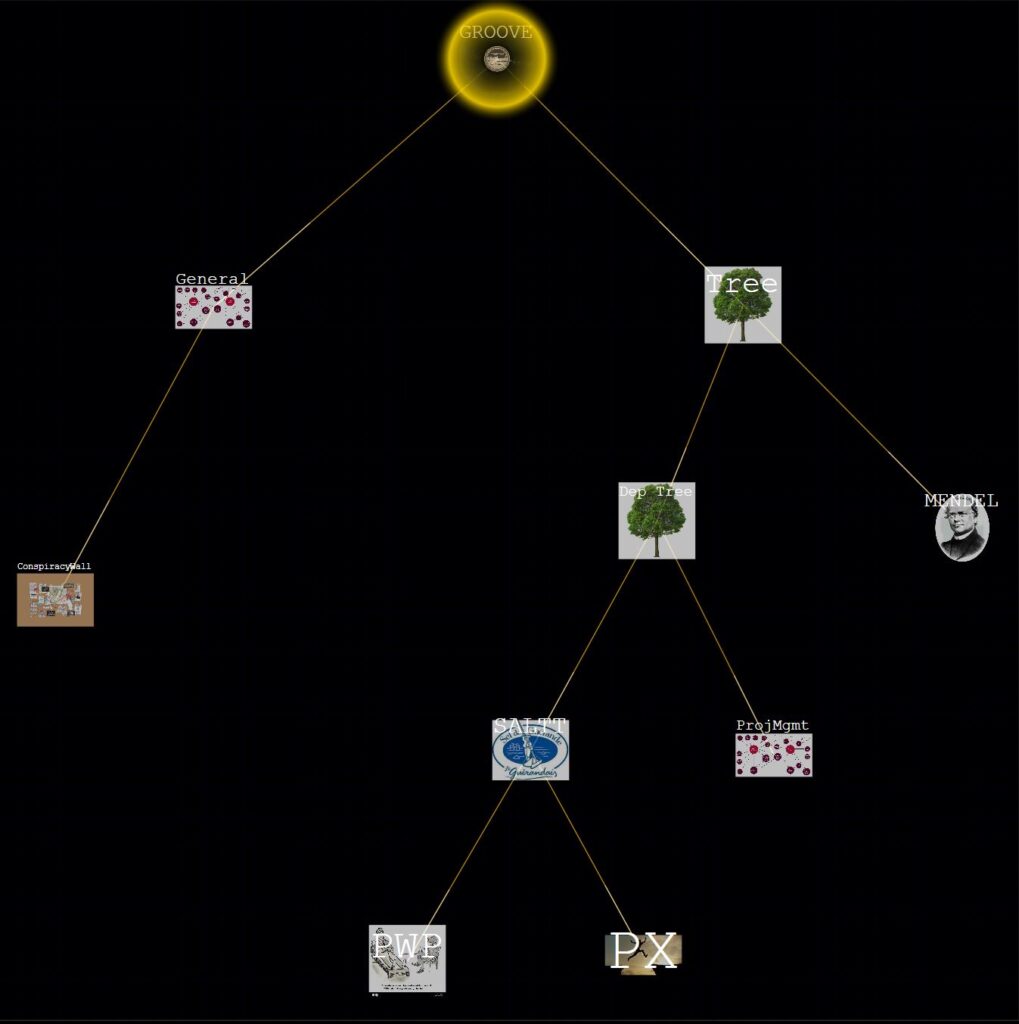
    Not all of the classes in the hierarchy are depicted nor will be released, but if they are, may be given more meaningful names, and other classes are likely to be added. Parsing the path down from the most general application class, the notable classes are.

    • GROOVE: Graph Relation Object Oriented Visual Environment is a general class: a visual environment for handling graph theoretical constructs using object oriented principles.
    • General: allows for graphs that are not specific to tree structures and supports loops and symmetric relationships.
    • Conspiracy Wall: is for modelling social relationships between people and pragmatic relationships between concepts. It is so named after a common trope seen on cop programmes.
    • Tree: handles general tree structures.
    • Dep. Tree. handles tree structures specifically relating to hierarchical dependencies (the above diagram is an example).
    • ProjMgmt.
    • SALTT: Salience Alignment Training Technology is about training the habits of identifying what is personally important and arranging action in that direction. SALTT moves the individual from languising to flourising and can be remedial at one end, while more self-guided generative learning at the other.
    • PWP is intended for Psychological Well-being Practitioners to guide their clients into finding what is important and motivating to them. It is intended to be used alongside remedial psychotherapy for common mental health conditions.
    • PX is intended for generative development of Personal Excellence. Rather than being about mental conditions, it is about becoming world class at a meaningful endeavor.

  • The SALTT Path

    Ok, I’ve never read the novel nor seen the film and probably never will. I’m calling this blog the SALTT Path. The first bit it rather obvious, but the term “path” is something from the mathematics of graph theory upon which SALTT is based.

    As with blogs, my proposed ambitions are high, but I am sure they will settle down eventually. The purpose of this blog is that of a mind dump as the ideas occur, then tidy them up, organise them, and put them into the main pages.

    SALTT is intended to be used a little like a digital drawing package and preserves a lot of the conventions, but for a more specific purpose of visualising, prioritising, and arranging ideas: it is a canvas. But like any other canvas, it needs the artist to know what they are going to do with it. The user guide can only show how the tools operate. These tools just bring fairly much established methodology up to date using digital platforms and human ineractivity. They facilitate the methodology but don’t determine it; and it is that underlying thinking behind the use of SALTT that needs conveying – what to use SALTT for.

    The SALTT Path, then as a blog, is here to present how this modern digital platform is applied to time served ancient wisdom.

    The beachhead market for SALTT is that of Psychological Wellbeing Practitioners (PWPs). As SALTT offers a means of organising ideas, PWPs can guide thier clients into recognising what is personally important thereby assisting behavioural change. But as a way of organising ideas, SALTT has more general “off-label” applicability.

    SALTT was not orignially intended to be for project management specifically; there are many project management packages already available. However, experimentation has shown that SALTT is amenable to managing projects in a more visual way. These “off-label” applications will also be explored in this SALTT Path blog.